Physical architecture
This architecture was evaluated in January 2026 with:
- A medium-sized parcel management organization in mind
- Support for parcel management workflows, with a target design load as described in the test methods section
- An enterprise geodatabase configured with SQL Server
- Microsoft Azure cloud infrastructure
The system was designed for and tested against the specified workflows, with adjustments to the machine types and sizes as needed based on test results.
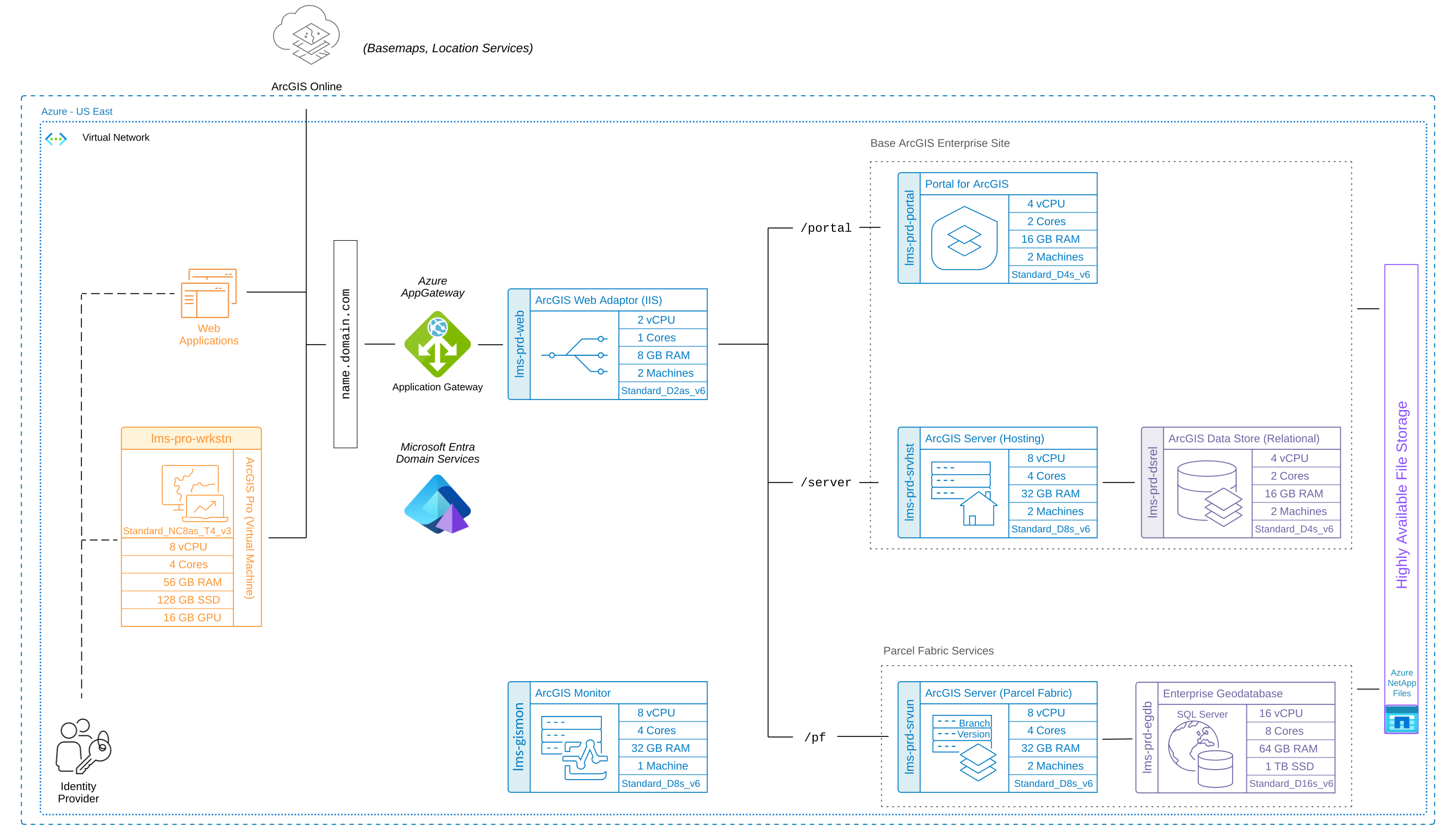
Download a Microsoft Visio file of this architecture. Learn more about diagramming resources for ArcGIS systems.
Note:
For more information on the software components and key interactions in this architecture, review the Land Information Management System reference architecture.
Machine types and sizes
The following represent the machine sizes chosen and validated for the scope and purpose of this test study. However, it is highly recommended to follow a complete design process to account for your business and technical requirements.
Esri offers system architecture design services should you need help determining all of the different factors relating to your organization’s physical design - such as networking, storage, system environments, and sizing. Minimum system requirements for each component are listed in the respective software documentation available online.
Desktop (ArcGIS Pro & web browser)
- 3 machines used in testing
- Standard_NC8as_T4_v3
- 8 vCPU
- 56 GB RAM
- 16 GB GPU
- 128 GB Disk
Portal for ArcGIS
- 2 machines
- Standard_D4s_v6
- 4 vCPU
- 16 GB RAM
- 128 GB Disk
Note:
For this test system, 2 cores was sufficient. However, Esri highly recommends a minimum of 4 cores for production systems.
ArcGIS GIS Server
- 2 machines
- Standard_D8s_v6
- 8 vCPU
- 32 GB RAM
- 128 GB Disk
ArcGIS Server (hosting server)
- 2 machines
- Standard_D8s_v6
- 8 vCPU
- 32 GB RAM
- 128 GB Disk
ArcGIS Data Store (relational)
- 2 machines
- Standard_D4s_v6
- 4 vCPU
- 16 GB RAM
- 128 GB Disk
ArcGIS Web Adaptor
- 2 machines
- Standard_D2as_v6
- 2 vCPU
- 8 GB RAM
- 128 GB Disk
ArcGIS Monitor
- 1 machine
- Standard_D8s_v6
- 8 vCPU
- 32 GB RAM
- 128 GB Disk
File storage
- 1 instance
- NetApp Files
- 100 MiB/s throughput
- 1 TB Disk
Database
- 1 machine
- Standard_D16s_v6
- 16 vCPU
- 64 GB RAM
- 1 TB Disk
Directory Services
- Microsoft Entra Domain Services
Additional infrastructure considerations
The following are additional areas of consideration when designing a Network Information Management System and an explanation of some infrastructure choices made for this test study.
To learn more about designing ArcGIS systems with Azure components and services, see Azure technologies.
Load balancing and reverse proxying
At least one third-party load balancer is required in a highly available ArcGIS Enterprise deployment - they handle client traffic to your portal and server sites and internal traffic between the software components. Although the ArcGIS Web Adaptor is considered a load balancer, it is insufficient on its own to serve as a load balancer in a high availability configuration. Therefore, in this test study, Azure Application Gateway was used.
Database considerations
For the scope and purposes of this test study, a choice was made to deploy SQL Server on a virtual machine. However, depending on your needs, you might consider leveraging a database platform service like Azure SQL Managed Instance in a Microsoft Azure environment.
Shared storage
To successfully implement a highly available ArcGIS Enterprise deployment, the configuration stores must be stored in a highly available, shared location. This ensures this data remains accessible even if one server fails, providing uninterrupted service to end-users. Additionally, shared storage simplifies data management in a multi-machine deployment and improves scalability by centralizing data storage and allowing for expansion as needed. In this test study, Azure NetApp Files was used.
System components not included in the diagram
Note that while antivirus software and Azure networking components are not illustrated in this diagram, they were present in the test study.