Test methods and results
Testing was conducted to validate that the design would perform as expected and support the workflows, users, and intended load. System tests provide the opportunity to discover and correct problems during system deployment in lower environments, ideally before they appear in production. For this test study, the focus of the testing approach was to validate the system would support the workflows, to understand how load would impact the system and its components, and end-user experience.
Each component was monitored as the workflows were conducted against different load scenarios. Upon test completion, results were assembled and analyzed to identify both bottlenecks and over-resourced components in the system. This information was used to identify system components that needed to be scaled up, down, or out before further testing was repeated.
Manual user experience testing was conducted by capturing screen recordings of the workflow testers to ensure users of the system could complete their workflows productively.
For more information, see how to design an effective test strategy.
Workflow pacing
This test study applied a pacing model to the tested workflows. The pacing model shows how the test intends to simulate the pace of work at a parcel management organization, where workflows are performed as some number of operations per hour across a team of staff resources. This approach was based on Esri customer input and aimed to match the medium-sized parcel management customer scenario that the data was based on.
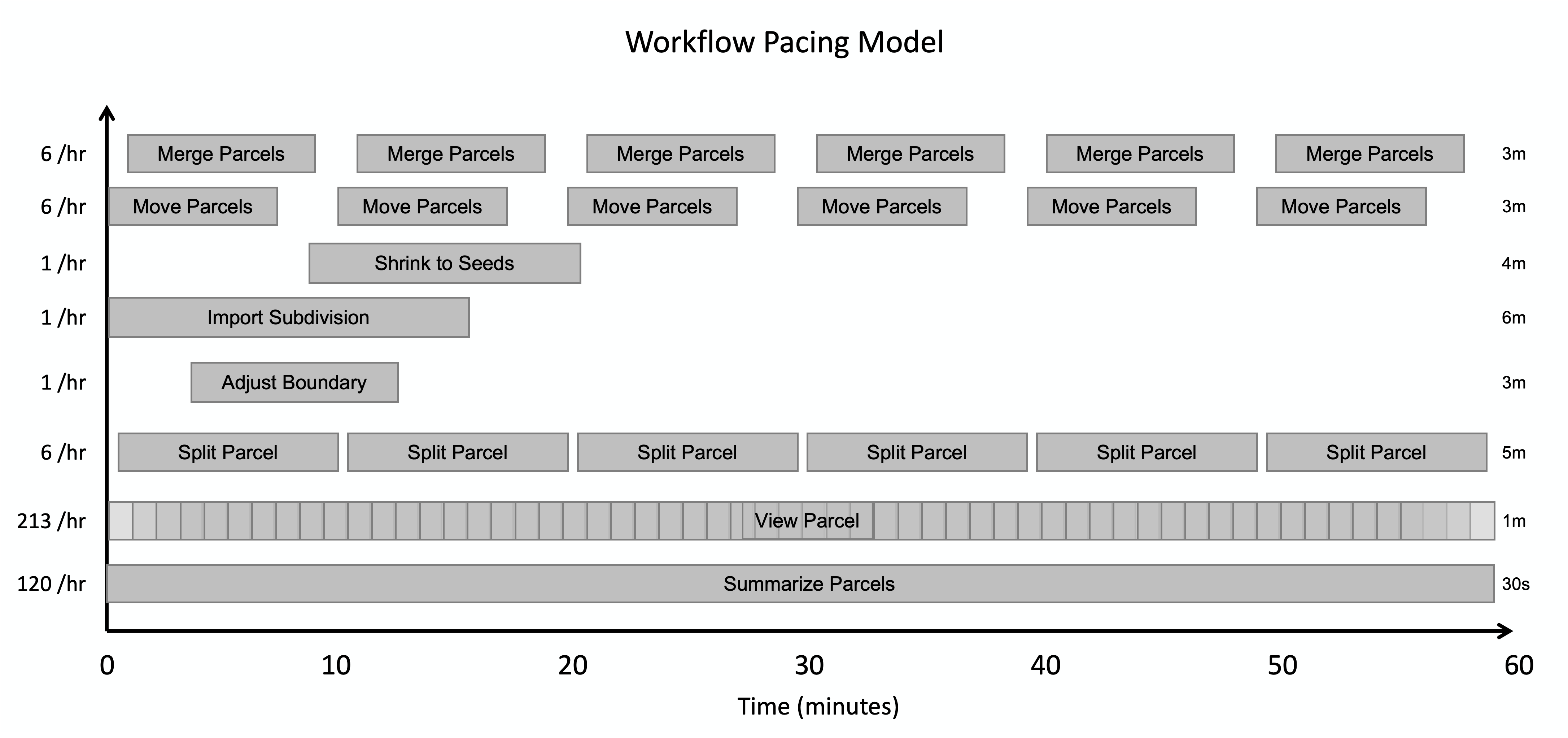
During the one-hour test period, workflows were distributed and staggered to avoid simultaneous initiation, while still allowing for overlap - mimicking how tasks unfold in real-world environments. In the pacing model below, you can see how we specified each workflow’s pacing and number of operations per hour, which define the system’s “design load”.
Note:
For example, you can see that in the pacing model our design load accounts for 120 “Summarize Parcels” workflows to be performed per hour. From working with customers, we determined this to be representative of how many times a medium-sized organization would collectively perform this workflow in an hour. However, this number of workflows could be completed by any number of actual users, as some organizations might have a smaller number of staff who each perform the workflow multiple times per hour, while others could have a larger group of users who each perform the workflow less frequently. However, the total number of operations per hour that the system supports remains the same regardless of the distribution among the users.
The load was then increased by multiplying the workflows to a point where the system was no longer able to provide acceptable responses or support successful workflows, or in this case, to a point where it was large enough to validate the system would work for the intended type of organization. Note that the workflow pacing model applied in this test study might not match typical daily use at your organization.
Performance testing tools
Because ArcGIS is a multi-tier system, performance tests were conducted across client, service, and data storage tiers, as well as the underlying infrastructure itself. In this test study, JMeter was used to simulate the user workflows and measure system performance under different loads. ArcGIS Pro requests were recorded and then replayed to simulate load in addition to manual workflows that were performed to assess end-user experience. Windows Performance Monitor and ArcGIS Monitor were also used to monitor resource utilization across different components.
For more information, see tools for performance testing.
Test results
This architecture was validated with automated load tests and manual users in three scenarios, and you can see the results from each below. At a high level, the test results show that as implemented, the system is adequately resourced to support loads from the design load through 8x the design load. Tests also reinforced the importance of proper application and system configuration for performance.
Test scenario: Design load
Observations:
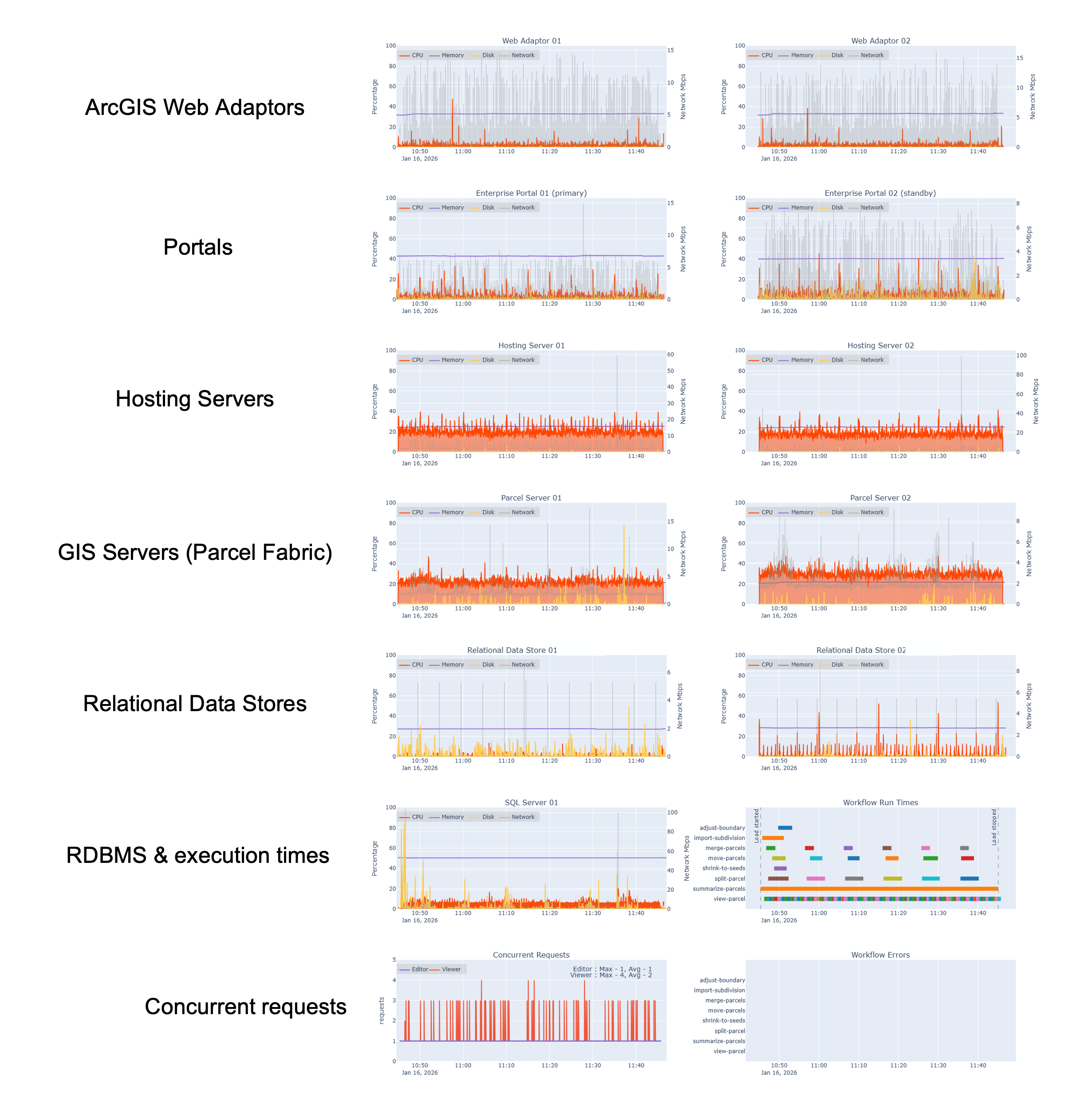
- The system supported the load
- Hosting servers (viewing workflows) averaged below 30% CPU utilization (orange lines)
- The parcel servers (editing workflows) averaged below 40% CPU utilization
- SQL Server shows very low CPU utilization, typically staying below 15%
- The spike in disk utilization on the SQL Server instance can be attributed to a background Windows process (gold lines)
- Concurrent requests show the system supporting roughly 3 concurrent viewer requests (red) and 1 concurrent editor request (blue) at any given time across the test period
Test scenario: 4x design load

Observations:
- The system supported the load, with marginal resource utilization increases across components
- Hosting servers generally averaged below 40% CPU utilization
- Parcel servers generally averaged below 50% CPU utilization
- SQL Server generally stayed below 40% CPU utilization
- Periodic spikes in disk utilization can be attributed to workflows starting or specific workflow steps. Specifically, the spike between 15:10-15:20 is associated with the Summarize Parcels workflow, where multiple dashboards open at the same time
- Concurrent requests show the system supporting an average of 10 - 15 concurrent viewer requests and editor requests throughout the test period, with larger peaks of concurrent view requests that close very quickly.
Test scenario: 8x design load

Observations:
- The system supports the load, with expected resource utilization increases across components
- Hosting servers generally stay below 50% CPU utilization
- Parcel servers generally stay below 50% CPU utilization
- SQL Server shows significant increases in resource utilization, consistently reaching about 60% CPU utilization.
- Concurrent requests show the system consistently supporting peaks of 35 concurrent viewer requests and an average of two concurrent editor requests across the test period.
- The spike of read requests at 20:20 is the Summarize Parcels workflow starting.
Service instance configuration
In addition to virtual machine resource utilization, we also monitored ArcSOC utilization for each test run, to help understand if our services were properly tuned. For all runs up to 8x design load, busy ArcSOCs were well below the maximum (16), indicating we had configured more map instances than we needed for those loads. If this was a production environment with loads below our 8x design load, we could choose to reduce the size of the hosting server and GIS server machines to save money. This assumes we would monitor ArcSOC utilization alongside server CPU and memory to know when scaling is needed to meet demand. Further, we would need to make sure we are not overloading those machines, because every ArcSOC uses some memory and every busy ArcSOC uses a virtual CPU.
We can see in the diagram below that all 16 ArcSOCs are busy at certain times on the hosting server site at 8x design load. When all ArcSOCs are busy, we would expect to see service wait times increase (which we observed). However, the parcel server (right) shows lower ArcSOC utilization, only reaching a maximum of 9 in use out of the 16 configured.
The initial spike on the hosting server (left) was caused by dashboards starting up at the start of testing. We’ve corrected the workflow pacing for future test runs, spreading dashboard startups across several minutes to better reflect real-world scenarios.

- To learn more, see this blog that details The art and science of ArcSOC optimization.
User experience - manual workflow times
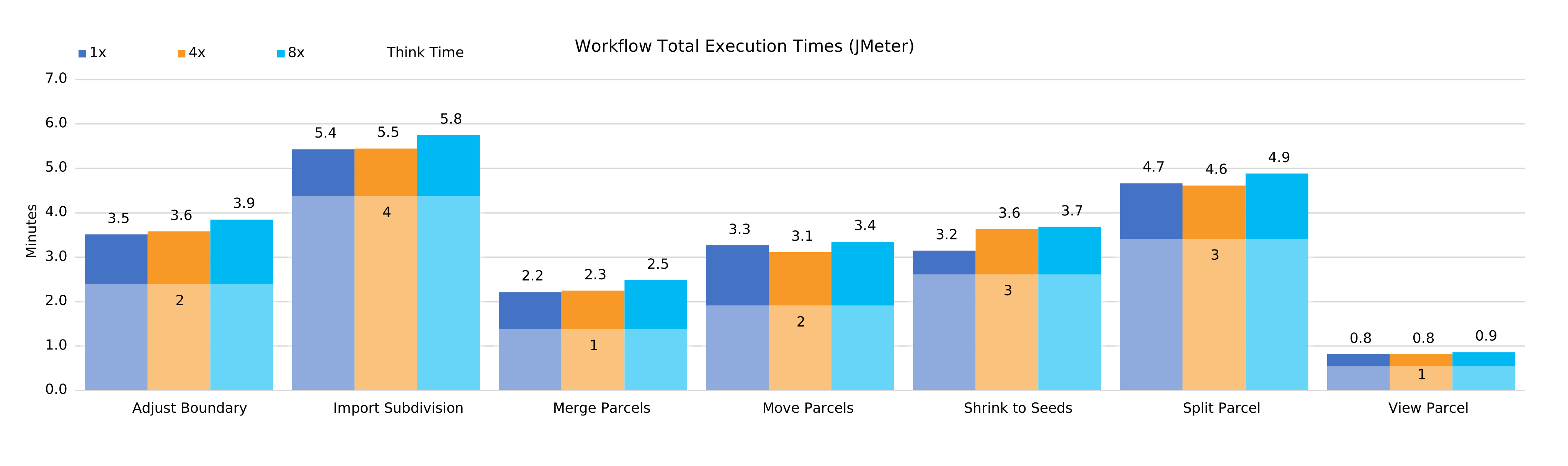
In addition to automated workflows, we also observed user experience by capturing screen recordings of the workflow testers and we extracted workflow durations (how long it took users to perform all steps in a workflow) from those recordings. This practice is to ensure the system’s users could complete their workflows productively.
As you can see in the chart below, the conducted workflow times are largely consistent with only minor variances across all test scenarios. This tells us that the system can support the increased load without negatively impacting perceived system responsiveness of end-users.
User experience - manual workflow step times
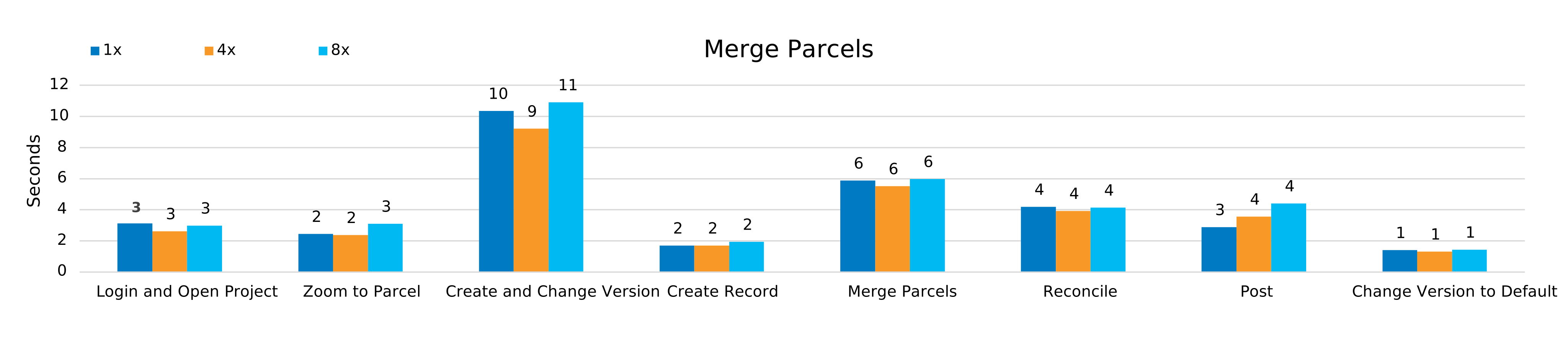
In addition to the workflows themselves, we also captured workflow times of key steps across all workflows. This represents the average time it took to complete a given step of each workflow while the system was under load. You can see in the chart below an example for the merge parcels workflow, where the time taken to complete each step was very consistent across all load scenarios. This pattern, with minor variability, is consistent across all workflows.
Conclusions and key takeaways
These tests were conducted in a test environment, not in a production system. Your system will likely differ in workflows, configuration, or design. For example, in Azure, the Web Adaptor is typically not used (assuming SAML) and the AppGateway distributes load directly to the servers. However, you can learn from these testing approaches and results for your own purposes:
- Designing for observability across the system provides invaluable information to properly tune performance against infrastructure costs, in addition to supporting other critical activities, like troubleshooting.
- Monitor your systems’ server resources, ArcSOC utilization, and workflow completion times - both during testing (in a stage/test environment) and in production.
- Look for areas of misalignment in resources and resource utilization. For example:
- At 8x our design load, the hosting server site seems properly sized for this volume of requests. However, the GIS Servers (parcel server) still have a lot of unused resources.
- There are several opportunities to scale down our infrastructure to save on costs while maintaining the same performance and user experience.
- There are also potential opportunities to reconfigure our ArcSOCs to be distributed more optimally to support our workflows.